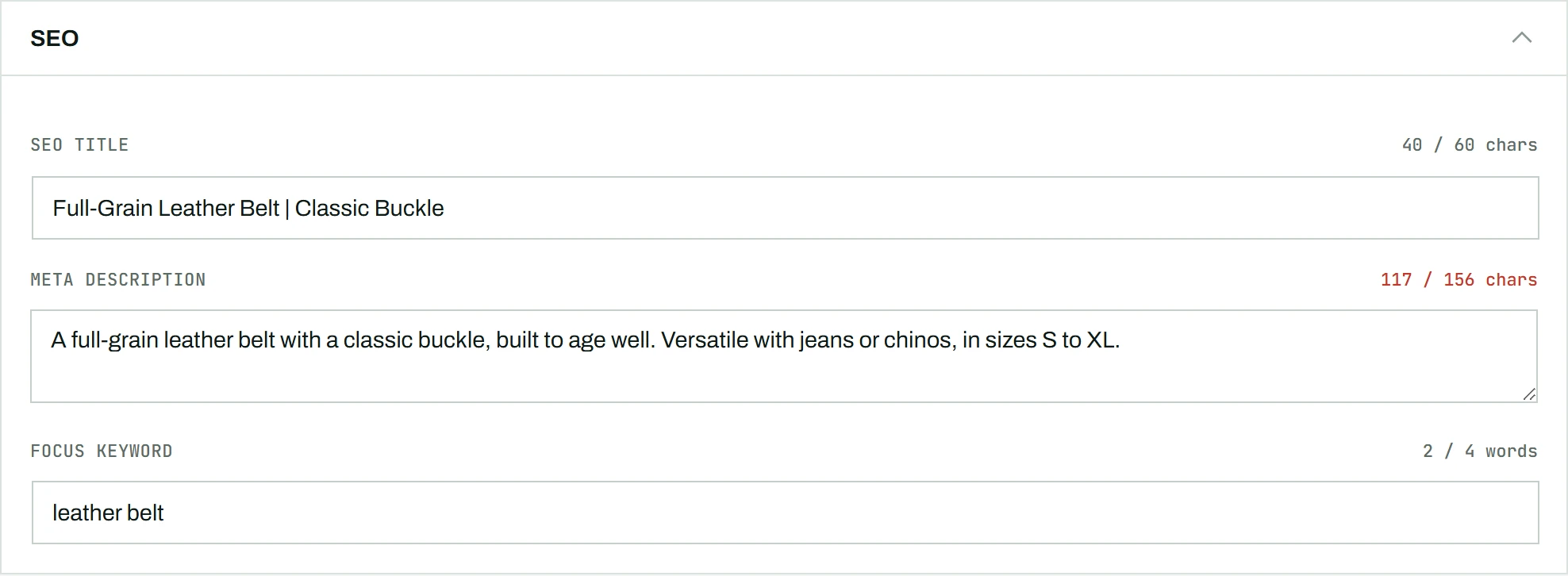
CataLord includes an SEO block right inside the product editor, so you can set a product’s SEO title, meta description, and focus keyword without leaving the single-screen editor. The block works with Yoast SEO or Rank Math: it reads and writes the exact fields those plugins already own, so nothing is duplicated and no conflicting tags are produced.
Free vs Pro
Viewing the SEO fields is available in the free CataLord plugin: the current SEO title, meta description, and focus keyword are shown read-only. Editing those fields, and using AI to draft them, are part of CataLord Pro.
Edit the fields
- Open a product in the CataLord editor and find the SEO block.
- Type your SEO title, meta description, and focus keyword.
- Click Save to write the values back to Yoast SEO or Rank Math.
Each field shows a live counter as you type: character length for the title and meta description, and word count for the focus keyword. The counter turns green when the value is inside the recommended range, so you can aim for a well-sized search-result snippet at a glance.
Let AI draft them
With Pro, AI can fill all three fields for you. Use Fill with AI on an existing product, or Import from URL when creating one, and leave the SEO fields option ticked. The drafts are written in your store’s language and trimmed to stay inside the ideal length.
No SEO plugin active
If neither Yoast SEO nor Rank Math is active, the SEO block shows a short notice instead of fields. CataLord never renders its own meta tags, so there is nothing to edit until one of those plugins is installed and active.
Tip: Put your focus keyword near the start of the SEO title and include it once in the meta description. Both Yoast and Rank Math check for this separately.